How to Build a QA Portfolio With Zero Experience (And Actually Get Interviews)
Here's the problem with breaking into QA: every job posting wants "1-2 years experience," but how do you get experience when no one will hire you without it?
The answer isn't lying on your resume. It's building a portfolio that proves you can think like a tester, document like a professional, and find bugs that matter.
And you can do all of this in 3-4 weeks, for free, without anyone's permission.
This isn't theory. We've worked with career switchers who used these exact projects to land their first interviews. One former retail manager built her portfolio over three weekends and got her first callback within two weeks of applying.
Here's how to do it.
Why Employers Care About Portfolios (More Than You Think)
Hiring managers see hundreds of resumes that say "detail-oriented" and "strong analytical skills." Yours looks exactly like everyone else's.
But a portfolio? That's different.
A portfolio shows:
- You understand what testing actually is
- You can document your work clearly
- You know how to use industry-standard tools
- You took initiative without being told
One hiring manager we spoke with said: "I'd rather see three well-documented test cases than a certification with no proof you can apply it."
Your portfolio is your proof.
The 3-Project Portfolio Framework
You don't need ten projects. You need three good ones that show different skills.
Project 1: Manual test case documentation
Project 2: Bug report with reproduction steps
Project 3: Basic test automation script (optional but powerful)
Let's build each one.
Project 1: Manual Testing Documentation
Time investment: 4-6 hours
What it proves: You can write clear, reproducible test cases
Pick Your Target Application
Choose a publicly available website or app. Good options:
- E-commerce checkout flows (like DemoQA practice site)
- Login/registration systems
- Search functionality
- Form validation
Pro tip: Don't pick Facebook or Amazon. Pick something smaller where you can realistically test the whole feature.
What to Document
Create a test plan that includes:
1. Test scope
- What you're testing: "User login functionality on [website]"
- What you're NOT testing: "Password reset, OAuth login, security vulnerabilities"
2. Test environment
- Browser: Chrome 122
- OS: Windows 11
- Screen resolution: 1920x1080
- Date tested: January 2026
3. Test cases (write 8-10)
Use this format:
Test Case ID: TC_LOGIN_001
Title: Successful login with valid credentials
Priority: High
Preconditions: User account exists with email test@example.com

Test Steps:
1. Navigate to https://example.com/login
2. Enter email: test@example.com
3. Enter password: ValidPass123!
4. Click "Login" button

Expected Result:
- User redirected to dashboard
- Welcome message displays: "Welcome, Test User"
- Session cookie created

Actual Result: [Pass/Fail]
Status: [Pass]
Why this format works: It's detailed enough that any developer could reproduce what you found. That's the standard.
Apply Test Design Techniques
Don't just test happy paths. Show you understand edge cases:
Equivalence Partitioning:
- Valid email formats
- Invalid email formats (missing @, no domain, special chars)
Boundary Value Analysis:
- Password minimum length (7 chars, 8 chars, 9 chars)
- Password maximum length (63 chars, 64 chars, 65 chars)
Negative Testing:
- Empty email field
- Empty password field
- SQL injection attempts (basic understanding)
- XSS attempts in input fields
Real example from a mentee's portfolio:
She tested a registration form and found that:
- Passwords over 72 characters were silently truncated
- The "confirm password" field accepted paste, but the "password" field didn't
- Error messages revealed whether an email was already registered (security issue)
She documented all three as bug reports. Two were valid bugs. The hiring manager asked her to walk through her testing process in the interview.
Where to Host This
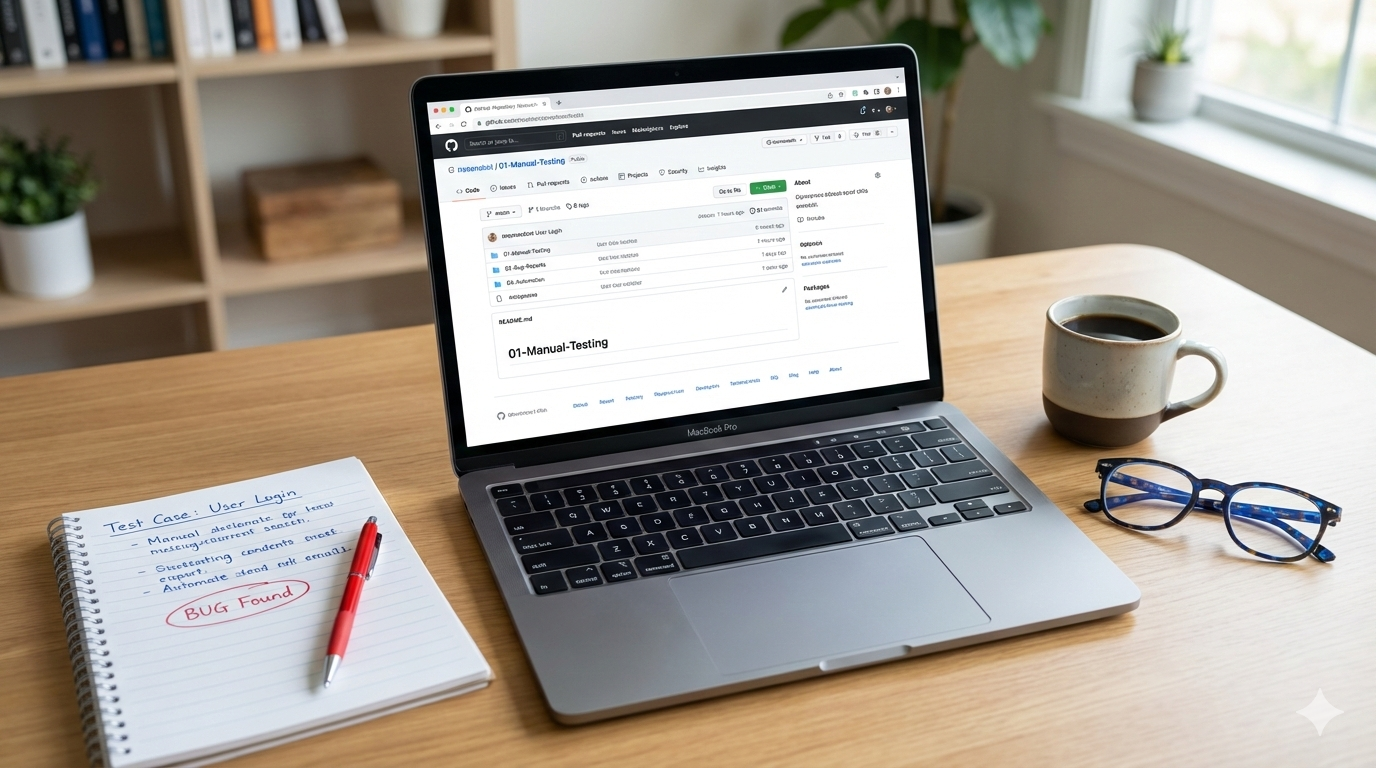
GitHub is your friend. Create a repository called "QA-Portfolio" and add:
- README.md with your name and project overview
- Folder:
01-Manual-Testing - Files:
test-plan.md,test-cases.xlsxor.csv
Template structure:
QA-Portfolio/
├── README.md
├── 01-Manual-Testing/
│   ├── test-plan.md
│   └── test-cases.xlsx
├── 02-Bug-Reports/
│   └── bug-report-login-issue.md
└── 03-Automation/ (optional)
    └── selenium-login-test.py
Pro tip: Write your README like you're explaining the project to a non-technical manager. What did you test? Why? What did you find?
Project 2: Bug Reports That Get Taken Seriously
Time investment: 3-4 hours
What it proves: You can communicate technical issues clearly
Find Real Bugs
Test any public website. You will find bugs. They might be small (UI alignment issues, unclear error messages), but that's okay. Professional bug reports matter more than critical bugs.
Where to practice:
- Practice testing sites: BugBug.io, Automation Practice
- Real sites: Pick any smaller e-commerce site, booking system, or SaaS tool
- Open-source projects: Find a project on GitHub and test it
Write a Professional Bug Report
Use this template:
**Bug ID:** BUG-001
**Title:** User can submit empty contact form without validation
**Severity:** Medium
**Priority:** High
**Environment:**
- Browser: Chrome 122.0
- OS: Windows 11
- URL: https://example.com/contact

**Description:**
The contact form allows submission with all fields empty. No client-side or server-side validation prevents this.

**Steps to Reproduce:**
1. Navigate to https://example.com/contact
2. Leave all fields (Name, Email, Message) empty
3. Click "Submit" button
4. Observe: Form submits successfully

**Expected Result:**
- Form should not submit
- Error messages should appear: "Name is required", "Email is required", "Message is required"

**Actual Result:**
- Form submits with empty data
- "Thank you" confirmation page displays
- No error messages shown

**Impact:**
- Database fills with empty submissions
- Support team wastes time processing invalid requests
- Poor user experience—no feedback that submission was invalid

**Attachments:**
- Screenshot: empty-form-submission.png
- Video: bug-reproduction.mp4 (optional but impressive)

**Suggested Fix:**
Add client-side validation using HTML5 `required` attributes and server-side validation to reject empty submissions.
Why this works:
Every section answers a question a developer would ask:
- Can I reproduce it? (Steps are clear)
- How bad is it? (Severity + Impact)
- What should happen instead? (Expected Result)
- Is there proof? (Screenshots/video)
Document 3-5 Bugs
Pick bugs with different severities:
- 1 high-severity bug (broken functionality)
- 2-3 medium bugs (usability issues, validation problems)
- 1-2 low-severity bugs (UI misalignment, typos)
Pro tip: Include one bug that you initially thought was a bug but turned out to be intentional behavior. Document why you thought it was a bug and what you learned. This shows critical thinking.
Host on GitHub
Add these to your 02-Bug-Reports/ folder. Each bug gets its own markdown file.
Project 3: Basic Test Automation (Optional but Powerful)
Time investment: 6-8 hours
What it proves: You understand automation basics
If you've never coded before, this might feel intimidating. That's okay—start simple.
Pick One Tool
For web testing: Selenium with Python
For API testing: Postman (then export to code)
Don't learn five tools. Learn one well enough to write three automated tests.
Write a Simple Selenium Test
Here's a real example (Python + Selenium):
from selenium import webdriver
from selenium.webdriver.common.by import By
import time

# Test: Verify successful login with valid credentials
def test_valid_login():
    driver = webdriver.Chrome()
    driver.get("https://example.com/login")

    # Enter credentials
    driver.find_element(By.ID, "email").send_keys("test@example.com")
    driver.find_element(By.ID, "password").send_keys("ValidPass123!")
    driver.find_element(By.ID, "login-button").click()

    # Wait for page load
    time.sleep(2)

    # Verify login success
    welcome_message = driver.find_element(By.CLASS_NAME, "welcome-text").text
    assert "Welcome" in welcome_message, "Login failed: Welcome message not found"

    print("Test Passed: Login successful")
    driver.quit()

if __name__ == "__main__":
    test_valid_login()
What this demonstrates:
- You can locate web elements (by ID, class, etc.)
- You understand assertions (checking expected vs actual)
- You can run a basic automated test
Document it clearly:
In your README, explain:
- What the test does
- How to run it (
python test_login.py) - What tools are required (
pip install selenium)
Start Even Simpler: Postman API Tests
If Selenium feels too complex, start with API testing in Postman:
- Pick a public API (like JSONPlaceholder)
- Write 5 tests:
- GET request returns 200 status
- POST request creates a resource
- Response time is under 500ms
- Response body contains expected fields
- Invalid request returns 404
Export your Postman collection and add it to your portfolio. Include screenshots of your test results.
How to Present Your Portfolio
Your README.md is Your Resume
Structure it like this:
# QA Tester Portfolio - [Your Name]

## About Me
Career switcher with [X] years in [previous field]. Transitioned to QA testing in [month/year]. Strong attention to detail, analytical mindset, and passion for delivering quality software.

## Skills
- Manual Testing (Test case design, Exploratory testing)
- Bug Reporting & Documentation
- Tools: JIRA, GitHub, Chrome DevTools, Postman
- Basic Automation: Selenium (Python), API testing
- Test Design Techniques: Equivalence Partitioning, Boundary Value Analysis

## Projects

### 1. E-Commerce Checkout Testing
**Description:** Manual testing of checkout flow on [website]
**What I did:** Wrote 15 test cases covering happy paths, edge cases, and negative scenarios. Found 4 usability issues.
**Tools:** Excel, Chrome DevTools
[View Test Cases](./01-Manual-Testing/)

### 2. Login Functionality Bug Reports
**Description:** Exploratory testing of login system
**What I found:** 5 bugs including validation issues and security concerns
**Tools:** Chrome DevTools, Screenpresso
[View Bug Reports](./02-Bug-Reports/)

### 3. Automated Login Tests (Selenium)
**Description:** Basic automated tests for login functionality
**What I automated:** 3 tests covering valid login, invalid credentials, and empty fields
**Tools:** Python, Selenium WebDriver
[View Code](./03-Automation/)

## Currently Learning
- ISTQB Foundation Level certification (planned: March 2026)
- Advanced Selenium (Page Object Model)
- SQL for database testing

## Contact
- **LinkedIn:** [Your LinkedIn URL]
- **Email:** your.email@example.com
- **Location:** [City, Country]
Why this works:
It tells a story. You're not hiding that you're a career switcher—you're showing you've done the work to prepare.
Make It Scannable
Hiring managers spend 30 seconds on your GitHub. Make sure:
- Your README has clear headers
- Each project has a one-sentence summary
- Links work (test them!)
- Screenshots are included where helpful
Real Portfolio Examples to Study
These are real GitHub portfolios from testers who got hired:
Example 1: Katarzyna Czekaj
github.com/k-czekaj/PORTFOLIO
What she did well:
- Clear table of contents
- Test cases based on user stories
- Bug reports with screenshots
- Showed progression (exploratory → structured testing)
Example 2: Tomasz Jaraczewski
github.com/t-jaraczewski/portfolio
What he did well:
- Included SQL tasks
- Documented tools he used
- Showed collaboration skills (team projects)
Study these. Notice how they structure their projects, write their READMEs, and present their work.
Common Mistakes to Avoid
Mistake 1: Testing Without a Plan
Don't just click around and write "I found bugs." Show your thought process:
- Why did you test this feature?
- What techniques did you use?
- How did you prioritize test cases?
Mistake 2: No Screenshots or Evidence
Bug reports without screenshots are just stories. Always include:
- Screenshot of the bug
- Screenshot of expected behavior (if possible)
- Console logs if relevant
Mistake 3: Overcomplicating It
You don't need:
- A fancy website
- Ten projects
- Advanced automation frameworks
You need:
- Three solid projects
- Clear documentation
- Professional presentation
Mistake 4: Never Updating It
Your portfolio should grow. After you complete a course, add a project. After you get certified, update your README.
Treat it like a living document.
Timeline: How Long Does This Actually Take?
Here's a realistic schedule if you're working 10-15 hours per week:
Week 1: Manual testing project (6 hours)
- Pick application (1 hour)
- Write test plan (2 hours)
- Execute tests & document (3 hours)
Week 2: Bug reports (4 hours)
- Find and test application (1 hour)
- Document 5 bugs with screenshots (3 hours)
Week 3: GitHub setup & README (3 hours)
- Create repository (30 min)
- Write README (1.5 hours)
- Format and polish (1 hour)
Week 4 (Optional): Basic automation (6-8 hours)
- Learn Selenium basics (3 hours)
- Write 3 simple tests (3 hours)
- Document and commit (1 hour)
Total time: 13-21 hours over 3-4 weeks.
That's it. You now have a portfolio that 90% of entry-level candidates don't have.
What Happens After You Build It
Put It on Your Resume
Under "Projects" or "Portfolio":
QA Testing Portfolio | github.com/your-username/QA-Portfolio
• Documented 15 manual test cases for e-commerce checkout flow using boundary value analysis and equivalence partitioning
• Identified and reported 5 bugs with detailed reproduction steps and impact analysis
• Created automated login tests using Selenium WebDriver (Python)
Link It on LinkedIn
Update your LinkedIn:
- Add GitHub link to "Featured" section
- Mention it in your summary: "View my testing portfolio at [link]"
- Share individual projects as posts
Use It in Interviews
When they ask: "Can you walk me through how you would test [feature]?"
You respond: "Actually, I tested something similar in my portfolio. Let me show you my approach..."
Then walk them through one of your projects. You've just turned a theoretical question into proof that you can do the work.
The Job Search Reality Check
Let's be honest about outcomes.
A portfolio alone won't get you a job. But it significantly increases your chances of getting an interview.
Without a portfolio:
- Your resume looks like 200 others
- No proof you can actually test
- Easy to filter out
With a portfolio:
- You stand out immediately
- Hiring managers can see your skills
- You have concrete examples for interviews
We've seen career switchers with portfolios get interviews at a 3-4× higher rate than those without.
Tools You'll Need (All Free)
For documentation:
- Google Docs or Microsoft Word
- Excel or Google Sheets
- Markdown editors (Typora, VS Code)
For bug tracking:
- GitHub Issues (built into GitHub)
- Screenshots: Windows Snipping Tool, macOS Screenshot, or Lightshot
For test management:
- Excel/Google Sheets (sufficient for portfolio)
- TestRail (free trial)
- TestLink (free, open-source)
For automation (optional):
- Python (free)
- Selenium WebDriver (free)
- Postman (free tier)
For hosting:
- GitHub (free for public repositories)
Total cost: €0
Your Next Steps
If you're serious about building your portfolio this month, here's what to do today:
- Create a GitHub account if you don't have one
- Pick one application to test (spend 10 minutes max deciding)
- Write your first test case using the template above
That's it. Don't overthink it. Start documenting.
By next week, you'll have Project 1 done. By the end of the month, you'll have a complete portfolio.
When You Need More Than Just a Portfolio
A portfolio proves you can test. But landing your first QA job requires more:
- Knowing which skills to prioritize
- Understanding what "job-ready" actually means
- Getting feedback on your work (is this test case good enough?)
- Practicing interviews before the real ones
- Having someone guide your job search strategy
This is why we built our mentoring program.
You don't just build a portfolio—you build it with feedback from someone who's hired QA engineers. Your test cases get reviewed. Your bug reports get critiqued. Your automation code gets improved.
And when you're ready to apply, we're there for Month 5: active job search coaching, CV tailoring, mock interviews, salary negotiation.
Ready to build your portfolio the right way? Apply for our Career Switcher mentoring program →
We're working with 8-10 mentees this cohort. Small groups mean you get real attention, not just course access.
Questions about building your QA portfolio? Drop them in the comments below. We read and respond to every one.
About TestTactix
We help non-tech professionals transition to QA careers through personalized 1-on-1 mentoring. Our 5-month program combines hands-on projects, expert guidance, and job search support to help you land your first QA role—no CS degree needed.